
voice-provider.md_+x
A voice provider is the service that speaks for your Zois on a voice call and listens to you. Out of the box Dreami uses its own, and you can swap in your own at any time.
Pick a provider#
- Dreami Voice: ready-made, nothing to set up. Your voice minutes (counted over a rolling 30 days) are shown in Settings > Patreon, or below the key card in Settings > AI text provider if you downloaded Dreami from CurseForge. It has no custom voices.
- Custom provider: your own services, with your own key. It works like the AI text provider page, so Choosing your AI is a good companion.

Set up your own#
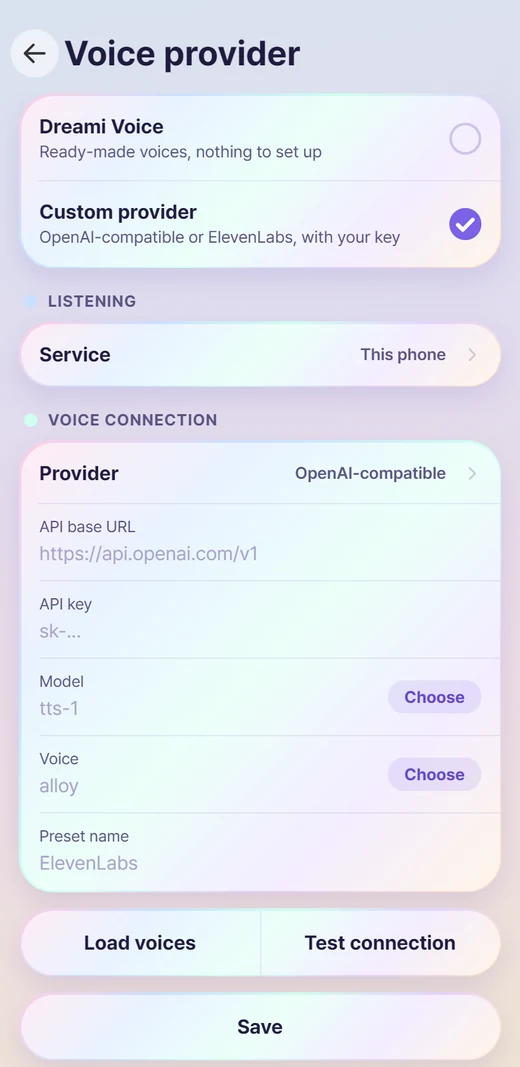
1Open Dreami in the Android app, then Settings > Voice provider, and choose Custom provider.
2Under Listening, pick this phone's own speech recognition or a Whisper-style service (an OpenAI-compatible address and key).
3Under Voice connection, pick OpenAI-compatible (OpenAI, OpenRouter and others) or ElevenLabs, then type your address, key, model and voice. Choose opens a list for Model and Voice.
4Tap Load voices to see what the service offers, and Test connection to check your key without making a sound.
5Tap Save. Give it a preset name to switch between services in one tap.
Voices#
- Tap the play button next to a voice to hear it. Picking a voice never plays one.
- A sample made by your service may use a little of your credit (ElevenLabs' own sample clips are free).
- To give one Zoi a voice of their own, open their card and tap Voice. Everyone else keeps the default.
- With ElevenLabs there is a Style tags switch that colours each sentence with how the Zoi feels. It only works with models that understand them, Eleven v4 and v3.
- Some services can't list their voices. Dreami then shows the usual ones, or you can type the voice's name.
Good to know#
- Each spoken reply is generated, sent to you and not saved: audio isn't stored on Dreami's servers.
- Set How to say your name under You if a voice mispronounces it (for example Neev for Niamh). Texts keep your real name.
TipIf listening on this phone keeps missing words, set Listening to your own Whisper service. It records the whole time, with no gaps.
TipIf a call stalls, check the status page. The Voice row shows whether the voice server is up.