
Wiki / Backups and your data
Backups and your data
Where your chats live, how backups work, and how to clear things.
backups.md_+x
Dreami keeps your chats, memories, profiles and settings on your own PC, never on Dreami's servers. That also means nobody else can restore them for you, so backups matter.
Automatic backups#
- Every 10 minutes of play, when something has changed, Dreami backs up your save. The last three are kept.
- A "live" copy is also kept, written at most every five minutes.
- Backups are kept outside Dreami's folder, so updating or reinstalling the mod doesn't touch them.
- Your settings are backed up too. Your AI keys get their own encrypted copy there, so they come back after an update or a restore, and only this game account can open them. The phone link isn't copied: after a restore you link your phone again. Photos you chose for cards aren't backed up either.
- You can turn automatic backups off with Back up automatically in Settings > Backups.
Manual backups and restoring#
In Settings > Backups:
- Back up now makes a copy right away.
- Restore a backup brings an earlier copy back. A "before a restore" copy is made first, so you can undo it.
- Copy back up folder location copies the folder's path, to paste into File Explorer.
The folder is %USERPROFILE%\Documents\inZOI\Mods\InGame\Dreami_Backups\User_Backup.
Uninstalling and reinstalling#
- Your backups stay outside the mod's folder, in the Dreami_Backups folder (
%USERPROFILE%\Documents\inZOI\Mods\InGame\Dreami_Backups). Removing the mod doesn't delete them. - If you reinstall Dreami and kept that folder, open Settings > Backups > Restore a backup to bring your chats and settings back.
- Delete the Dreami_Backups folder as well only if you want everything gone.
- Your settings, logs and AI keys live in Dreami's data folder,
%USERPROFILE%\Documents\inZOI\Mods\InGame\DayDream_763BB5E0, and an encrypted copy of the keys is kept in the Dreami_Backups folder so an update doesn't lose them. To remove your keys completely, unlink Patreon in Settings > Patreon if you linked it, and delete both folders.
Clearing things#
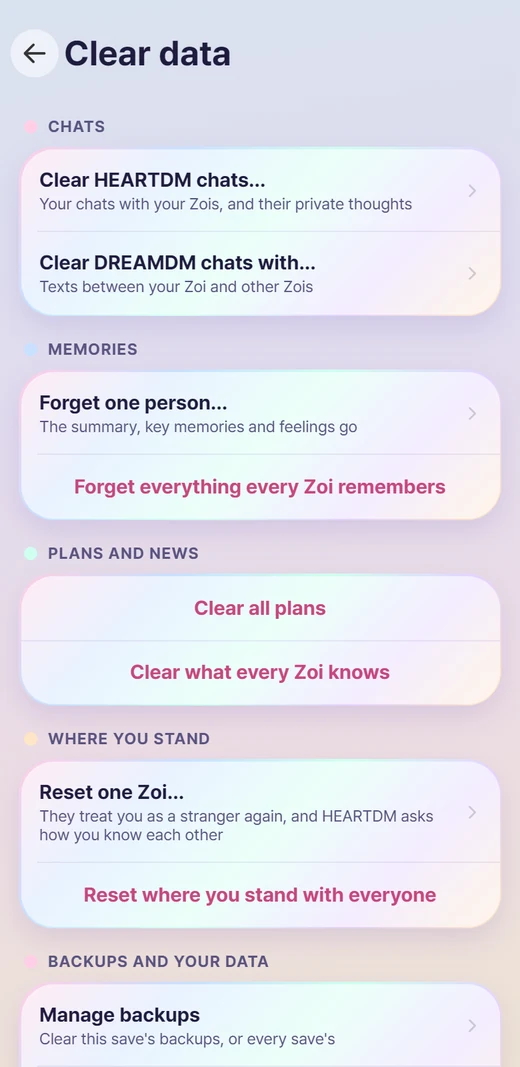
Settings > Clear data has everything you can delete or reset: chats, one person's memories or everyone's, where you stand with a Zoi, plans, what Zois know, backups, and what Dreami keeps about your Patreon membership. Each asks first.
TipCopy the whole Dreami_Backups folder somewhere safe now and then. If your PC is wiped, or you remove Dreami and delete that folder, a copy elsewhere is the only thing that can bring your chats back.