
Profiles and photos
Your profile, Zoi cards, what Zois know, notes and your own pictures.
Dreami gives everyone a card, a bit like a contact card on a real phone.
Your profile#
Open You on the hub. Under About you, set your name, last name, age, pronouns, what you're like and things you want Zois to know about you. Your name is needed before you can talk to a Zoi; everything else is optional. The Zois read this, so they know you as a person. You edit one row at a time: tapping another row saves the first. How to say your name is optional: spell it the way it sounds (Neev for Niamh). Voices use it on calls, and your texts keep your real name.
Zoi cards#
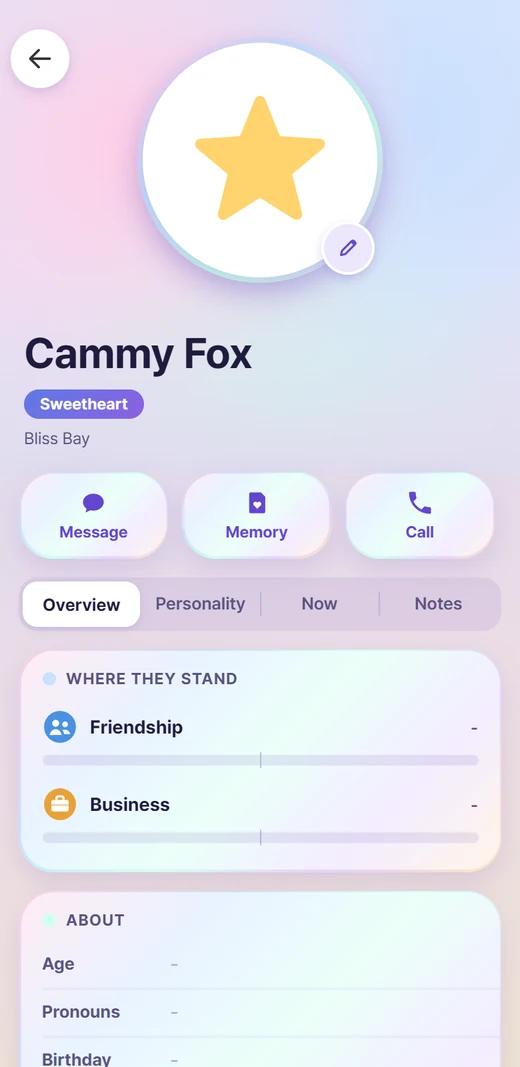
Under the name are Message, Memory and Call, then the tabs:
- Overview: where they stand with your Zoi, the basics, family, looks and plans.
- Personality: what the game says, with room to add to their personality in your own words, and their Quirks. See Quirks and Lately.
- Now: what they are doing, how they feel and why, and how they are Lately.
- Backstory on your own Zoi, Notes on everyone else: their backstory, boxes like Fears and Hobbies, example texts, secrets and sections of your own. Name another Zoi in a box and a Linked line opens their card. Their notes are what the Zoi writes as their feelings change, and Your notes are yours.
- Knows: what they know about other people. See below.
- Nickname: how your Zoi has someone saved.
What a Zoi knows about another depends on how close they are: everyone sees how someone looks, friends also know their personality, and partners or family know their backstory too.
What they know#
The Knows tab lists what a Zoi knows about other people, in plain words: how they learned it (they saw it, were told, or heard it as gossip), when, and whether they believe it. A Zoi only knows what they took part in, saw or were told, and news from someone else can be believed, doubted or dismissed. What they know reaches their texts, and they may pass it on.
If they got something wrong, fix it: turn on Settings > Memory > Edit feelings and relationships, then tap a row to change its words, the belief or the people it links, or remove it. Add something they know writes a new one.
Photos#
Each card shows the Zoi's portrait from your save. A Zoi with no portrait gets a little pastel shape instead (a heart, star, moon and so on), always the same one for the same Zoi. You can also give anyone your own picture: